项目初衷
节省磁盘空间#
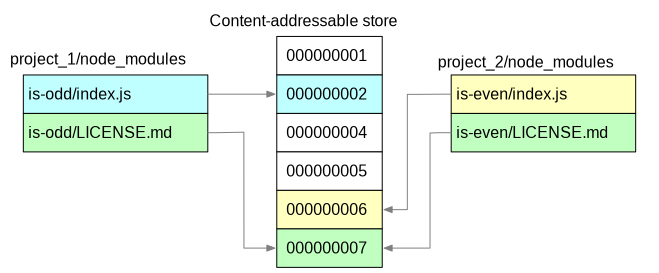
使用 npm 时,依赖每次被不同的项目使用,都会重复安装一次。 而在使用 pnpm 时,依赖会被存储在内容可寻址的存储中,所以:
- 如果你用到了某依赖项的不同版本,只会将不同版本间有差异的文件添加到仓库。例如,如果某个包有 100 个文件,而它的新版本只改变了其中 1 个文件。那么
pnpm update时只会向存储中额外添加 1 个新文件,而不会因为单个改变克隆整个依赖。 - 所有文件都会存储在硬盘上的某一位置。当软件包被被安装时,包里的文件会硬链接到这一位置,而不会占用额外的磁盘空间。这允许你跨项目地共享同一版本的依赖。
As a result, you save a lot of space on your disk proportional to the number of projects and dependencies, and you have a lot faster installations.
提高安装速度#
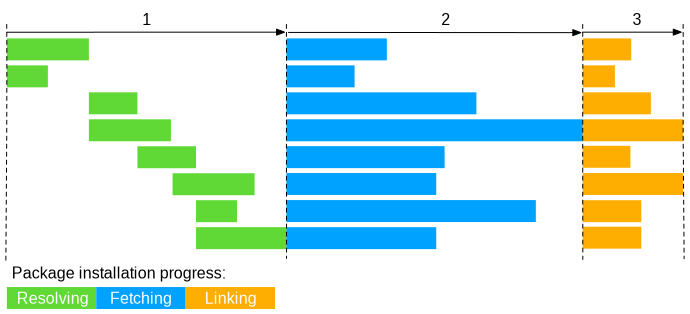
pnpm 分三个阶段执行安装:
- 依赖解析。仓库中没有的依赖都被识别并获取到仓库。
- 目录结构计算。
node_modules目录结构是根据依赖计算出来的。 - 链接依赖项。所有以前安装过的依赖项都会直接从存储区中获取并链接到
node_modules。
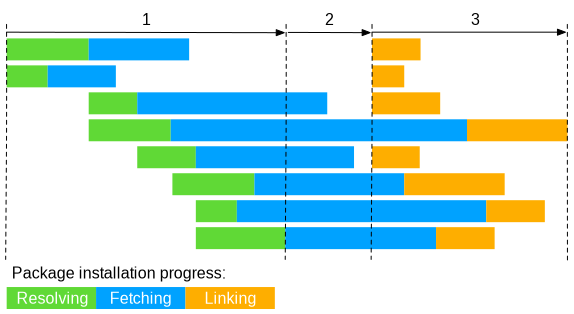
This approach is faster than the traditional three-stage installation process of resolving, fetching, and writing all dependencies to node_modules.
创建一个非扁平的 node_modules 目录#
使用 npm 或 Yarn Classic 安装依赖项时,所有的包都被提升到模块目录的根目录。这样就导致了一个问题,源码可以直接访问和修改依赖,而不是作为只读的项目依赖。
默认情况下,pnpm 使用符号链接将项目的直接依赖项添加到模块目录的根目录中。
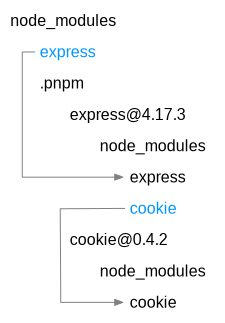
如果你想了解有关 pnpm 创建的独特的 node_modules 结构的更多详情,以及它为何能与 Node.js 生态系统良好配合,请阅读:
提示
如果你的工具不适用于符号链接,你仍然可以使用 pnpm 并将 node-linker 设置设置为 hoisted。这样 pnpm 就会创建一个类似于 npm 和 Yarn Classic 创建的 node_modules 目录。