🚀 pnpm in 2025
2025 has been a transformative year for pnpm. While our primary focus was redefining the security model of package management, we also delivered significant improvements in performance and developer experience.
From blocking lifecycle scripts by default to introducing a global virtual store, here is a look back at the major features shipped in 2025.
Usage#
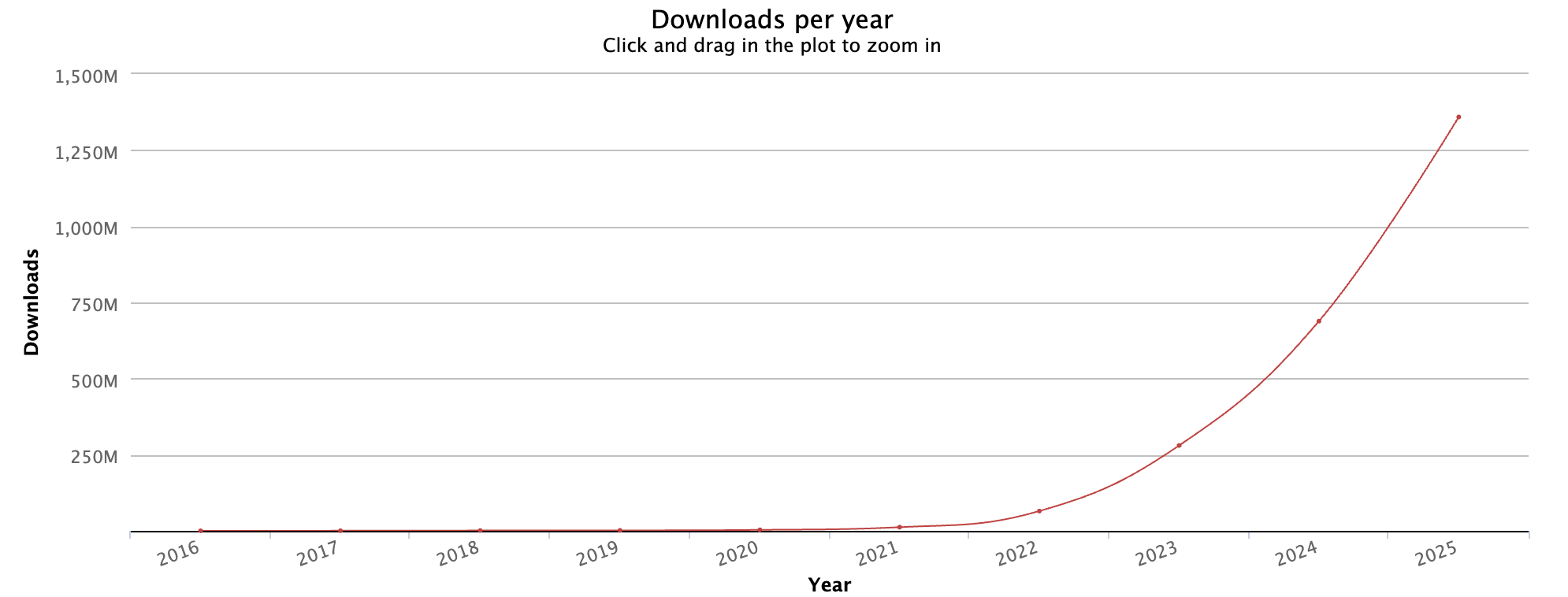
According to download stats pnpm was downloaded 2 times more than in 2024!
Redesign of the Homepage#
You may have noticed that we have redesigned our homepage! This redesign was made possible by our most prominent sponsor, Bit.cloud.
The new homepage is now built with Bit components and much of the work was done using Bit's AI agent: Hope AI. We even have our own design system now.
informação
I work full time at Bit on dependency management. Under the hood Bit uses pnpm for installation.
Presentation at JSNation#
This year was a huge milestone for me personally as I had my first ever live presentation at a big international conference: JSNation in June in Amsterdam. I would like to thank the JSNation team for this great opportunity!

I was pleasantly surprised how well known pnpm is in the community and how many people use it at their work!
My presentation was about config dependencies and you can see the recording here.
Features que se destacam#
Now, let’s dive into the most significant changes shipped in pnpm v10 throughout 2025.
Security by Default#
The most significant shift this year was pnpm's move to "Security by Default." In pnpm v10.0, we stopped implicitly trusting installed packages.
Blocking Lifecycle Scripts (v10.0)#
For years, pnpm install meant trusting the entire dependency tree to execute arbitrary code. In v10, we turned this off. pnpm no longer runs preinstall or postinstall scripts by default, eliminating a massive class of supply chain attack vectors.
To refine this control, we introduced allowBuilds in v10.26, replacing the earlier onlyBuiltDependencies with a more flexible configuration:
allowBuilds:
  esbuild: true
  # Only allow specific versions
  nx@21.6.4: true
Defense in Depth (v10.16 & v10.21)#
We didn't stop at scripts. We added layers of defense to catch malicious packages before they even reach your disk:
minimumReleaseAge: Blocks "zero-day" releases (e.g., packages younger than 24 hours), giving the community time to flag malicious updates.trustPolicy: no-downgrade: Prevents installing updates that have weaker provenance than previous versions (e.g., a version published without CI/CD verification).blockExoticSubdeps: Prevents trusted dependencies from pulling in transitive dependencies from untrusted sources.
Global Virtual Store (v10.12)#
One of pnpm's original innovations was the content-addressable store, which saved disk space by deduplicating files. In v10.12, we took this a step further with the Global Virtual Store.
Previously, projects had their own node_modules structure. With enableGlobalVirtualStore: true, pnpm can now link dependencies from a central location on disk directly into your project. This means:
- Massive Disk Savings: Identical dependency graphs are shared across projects.
- Faster Installs: If you have 10 projects using
react@19, pnpm only needs to link it once globally.
Native JSR Support (v10.9)#
We embraced the new JSR registry with native support. You can now install packages directly from JSR using the jsr: protocol:
pnpm add jsr:@std/collections
This maps correctly in package.json and handles the unique resolution rules of JSR packages seamlessly alongside your npm dependencies.
Config Dependencies (v10.0)#
For monorepos and complex setups, we introduced Config Dependencies. This feature allows you to share and centralize pnpm configuration—like hooks, patches, and build permissions—across multiple projects.
Config dependencies are installed into node_modules/.pnpm-config before the main dependency graph is resolved. This means you can use them to:
- Share
.pnpmfile.cjshooks across repositories. - Centralize patch files for
patchedDependencies. - Maintain a shared list of packages that are allowed to execute build scripts for
allowBuilds.
configDependencies:
  pnpm-plugin-my-company: "1.0.0+sha512-..."
This ensures your pnpm configuration is versioned, consistent, and available exactly when the package manager needs it.
Automatic JavaScript Runtime Management (v10.14 & v10.21)#
We have supported Node.js runtime management for a while now. In 2025, we extended this to support other runtimes like Deno and Bun.
You can now specify the required runtime in package.json via devEngines.runtime:
{
  "devEngines": {
    "runtime": {
      "name": "node",
      "version": "24.6.0"
    }
  }
}
pnpm will automatically download and use that specific version of the runtime for running scripts in that project. This makes "Works on my machine" a thing of the past—everyone on the team uses the exact same runtime, managed entirely by pnpm.
Looking Ahead#
We have already started working on pnpm v11.0, which has some noticeable performance improvements. The global virtual store will not yet be enabled by default. We will work on bug fixes and missing features to potentially enable it by default in a future major release.